Sobriety Counter App for iPhone: Days Clean, Money Saved and Slips
Count the days since your last drink or cigarette with Calendarly’s free quit counter: milestones, money and hours saved, slips with their reasons, and Days Clean on the Lock Screen, compared with I Am Sober, Sober Time, Nomo and Days Since.
A sobriety counter app shows how long it has been since your last drink, cigarette or whatever you are giving up, and it should sit where you will see it when the urge comes. Calendarly does this for free on iOS 26 and later: add a habit to quit, set the date and time you stopped, and it counts the days clean on its Today page, in a Days Clean widget on the Home Screen or the Lock Screen, and on a page that adds up the money and hours you have won back.
Most people who search for a sobriety counter already know their date. What they want is a number that stays honest, a way to log a slip without losing everything they learned from it, and a counter that does not hide three screens deep in an app they stopped opening. Recovery apps like I Am Sober and Nomo also bring a community, and some people need exactly that. This guide shows how the quit counter in Calendarly works, compares it with four apps built only for sobriety, and says plainly when one of those is the better pick.
What the quit counter shows
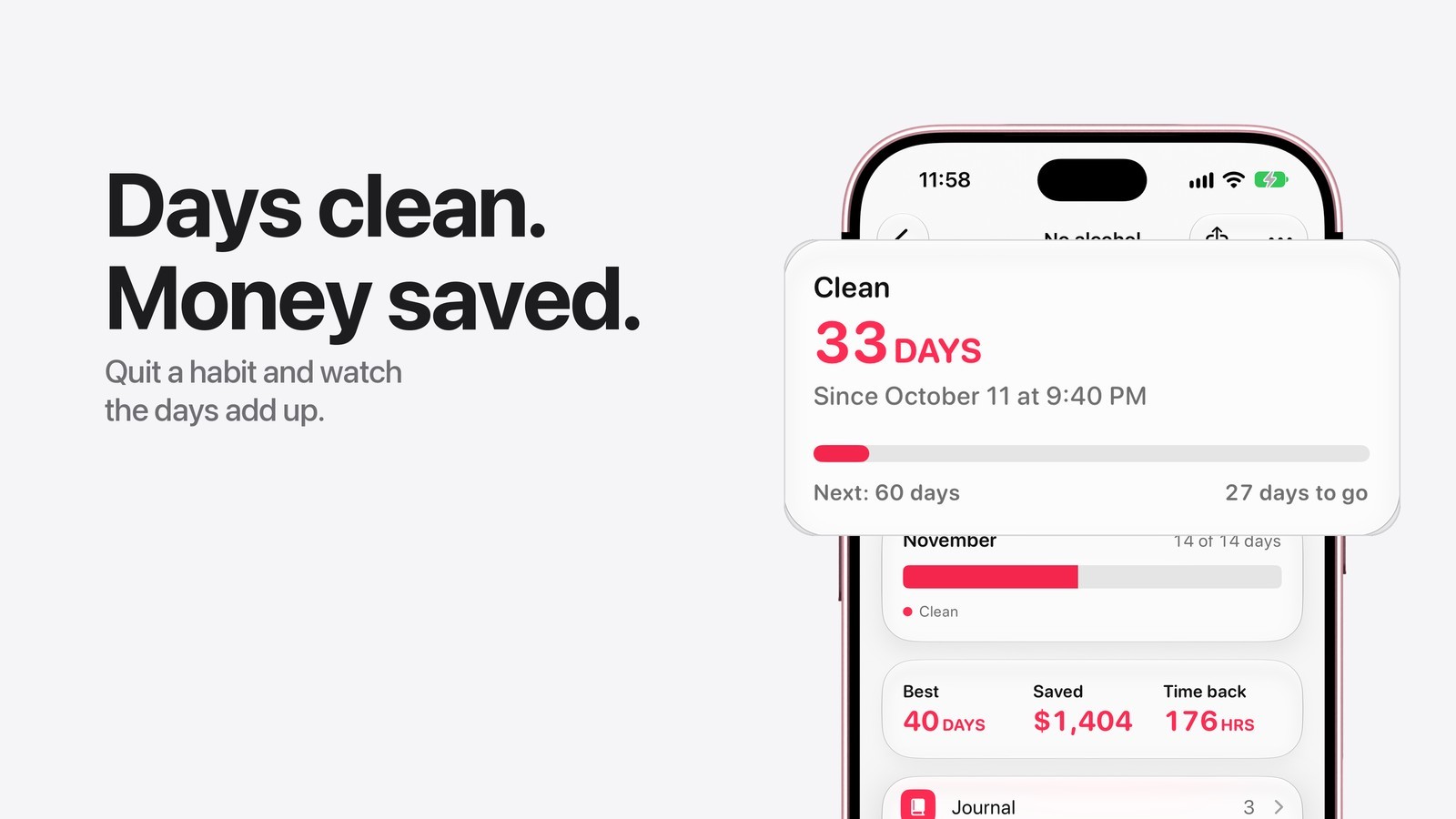
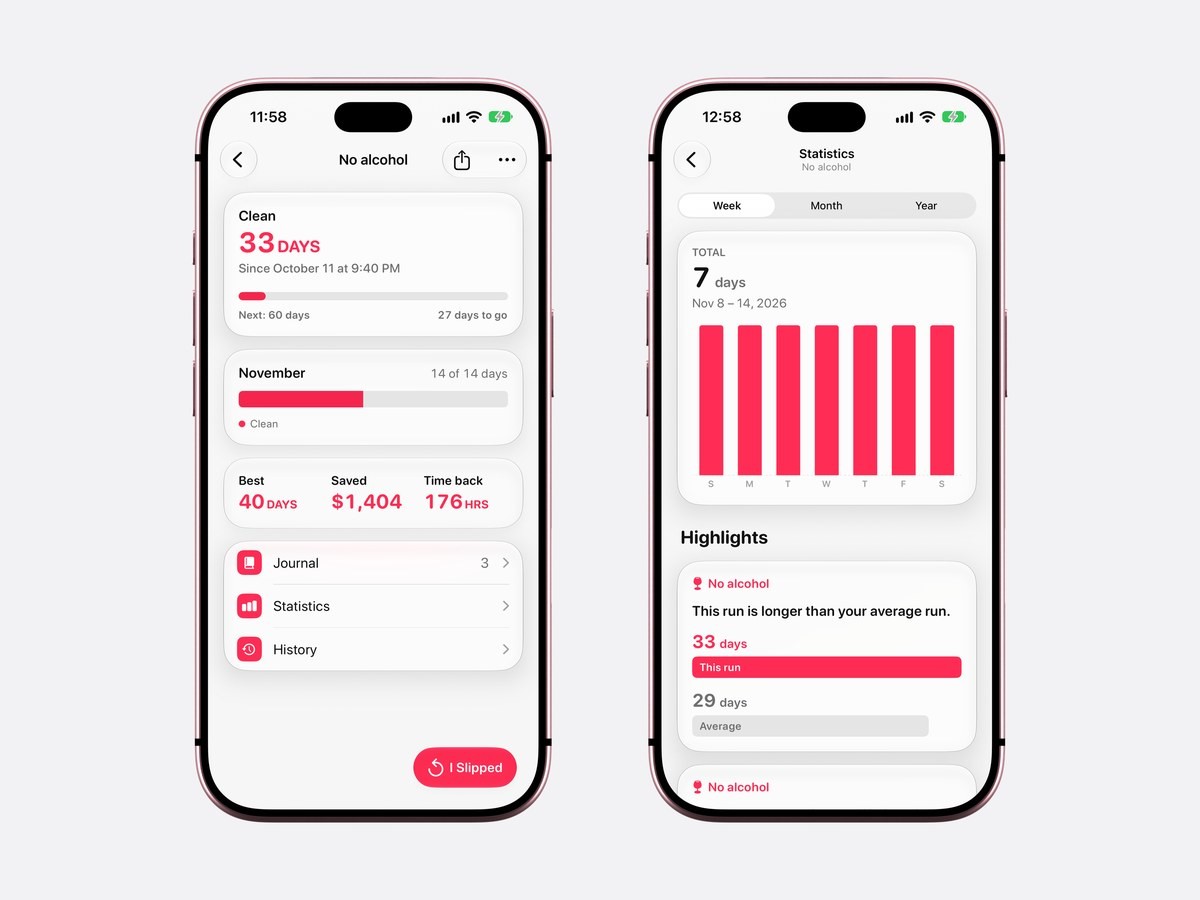
A habit to quit counts up from a moment, such as Since October 11 at 9:40 PM, so the number is right from the first time you open it. The top of the habit’s page shows the days clean in large type and a bar toward the next milestone: at 33 days it reads Next: 60 days, 27 days to go. The milestones are 1, 3, 7, 14, 30, 60 and 90 days, then 180 days, one, two, three, five and ten years.
Below that, the month shows how many of its days were clean, and a row of three numbers gives your best run, the money saved and the time back. Those last two need one thing from you when you add the habit: what it used to cost a day, in money, in minutes, or both. In the picture below, 33 clean days come to $1,404 and 176 hours, and both numbers keep growing while you stay clean. The currency follows your iPhone’s region, and you can pick another.
When you slip
The red I Slipped button sits at the foot of the habit’s page. Tap it and a short sheet asks When, with the time already filled in, and Why, with six reasons to choose from: Stress, With people, Boredom, Tired, Craving and Celebrating. A line called What happened? takes a sentence or two in your own words, and none of it is required. Save, and the count starts again from that moment, on the page and in every widget of that habit.
The old run is kept. Your best run stays on the page, and Statistics compares the run you are on with your average one, so after a slip you can see when a new run passes your usual one: 33 days against an average of 29 in the picture above. The Journal keeps every slip with its note, and once there are a few, Statistics names the most common reason, the time of day slips usually happen and the weekday they come most often.
A slip logged by mistake can be opened from the Journal and changed or removed with Delete Slip.
Days clean on the Home Screen and the Lock Screen
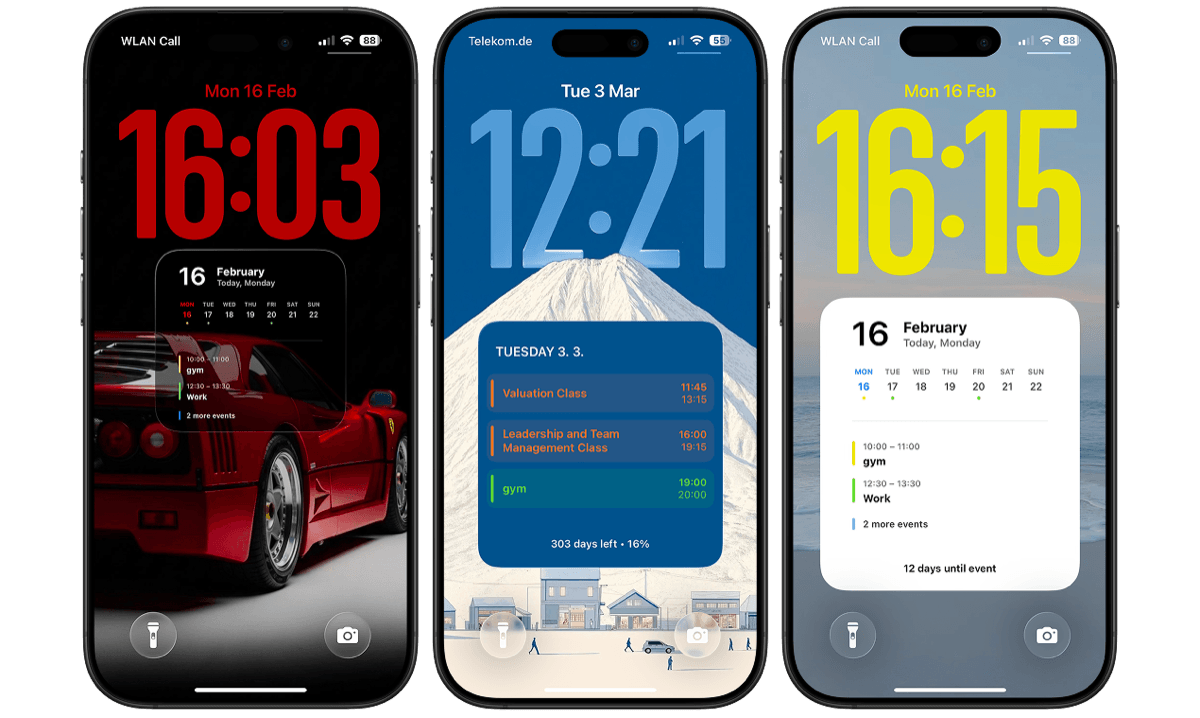
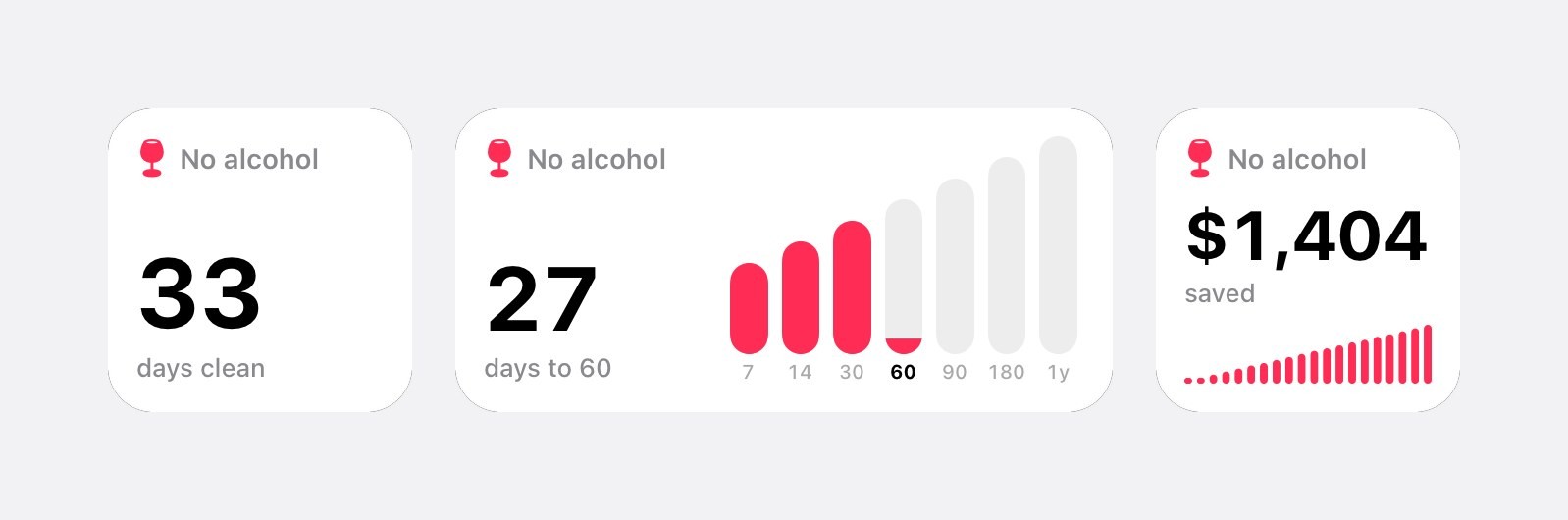
Three free widgets belong to habits you quit. Days Clean is the number alone, in small or medium on the Home Screen and as a rectangle or one line on the Lock Screen. Next Milestone draws the milestones as bars and says how many days are left to the next one. What You Saved adds up the money, with a small bar for every clean day. In Edit Widget each one lists only your habits to quit, so with two of them, such as No alcohol and No smoking, every widget can count a different one.
The Lock Screen is the one most people ask about, because it is the screen you see when you reach for the phone without thinking. Apple’s guide to making a custom Lock Screen shows where the widgets go. All nine habit widgets, including those for habits you build, are described in habit tracker widgets for iPhone.
How to set up a sobriety counter on iPhone
- 1Download Calendarly
Get Calendarly from the App Store. It is free, asks for no account, and its habits need iOS 26 or later.
- 2Add a habit to quit
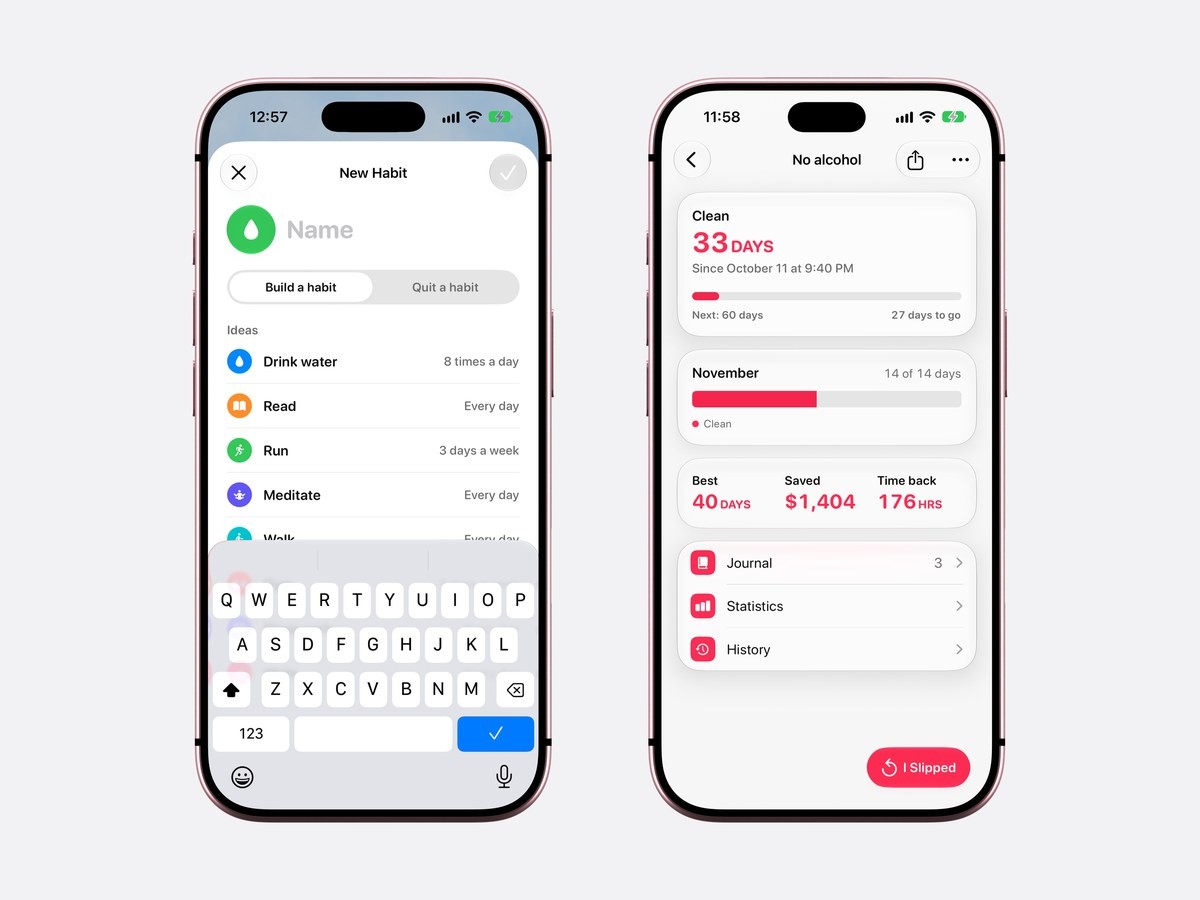
Calendarly opens on Today. Tap the plus button, choose Habit, then Quit a habit. Pick an idea such as No alcohol or No smoking, or type a name of your own.
- 3Set when you stopped
Choose the date and the time of your last drink or cigarette. A date in the past works, so a counter you kept somewhere else carries over with the same number.
- 4Add what it cost
Enter what the habit cost you a day, in money, minutes or both, so the page and What You Saved can add it up. You can skip this.
- 5Put Days Clean on the Lock Screen
Touch and hold the Lock Screen, tap Customize, tap the space under the clock and choose Calendarly’s Days Clean. On the Home Screen, touch and hold, tap Edit, then Add Widget.
Calendarly against sobriety counter apps
The four apps below are built for sobriety alone. The facts come from each app’s App Store page in the US store, read on 16 November 2026. Not named means the listing does not mention it; the app may still have it.
| App | What it is | Money saved | Slips and notes | Community | Widgets in the listing | Needs |
|---|---|---|---|---|---|---|
| Calendarly | Habits to build and to quit next to your day’s calendar | Yes, money and time | Yes, with when, why and a note | No | Days Clean, Next Milestone, What You Saved; Lock Screen | iOS 26 |
| I Am Sober | Sobriety tracker with a daily pledge and a large community; Sober Plus subscription | Yes, money and time | Daily notes, triggers | Yes | Not named | iOS 15.1 |
| Sober Time | Counters for many addictions, down to the second | Yes | Yes, relapses with notes | Yes, a forum | Not named | iOS 17.0 |
| Nomo | Sobriety clocks, made by a person in recovery | Yes | Clock resets, journaling | Accountability partners, an encouragement wall | Not named | iOS 17.0 |
| Days Since | A plain counter for each habit you are quitting | Not named | Not named | No | Not named | iOS 16.6 |
If you want other people with you, pick one of the recovery apps. I Am Sober has milestone stories from other members and, with Sober Plus, private groups for people who also go to meetings, and Nomo can tell an accountability partner when a clock is reset or when you feel tempted. Sober Time suits someone who likes watching the seconds tick and changing how the counter looks.
Calendarly is for people who want the count to stay private and to sit inside the day they already plan. The days clean sit at the top of Today, above the meetings and the to-dos, next to habits you are building, such as a run three times a week, and the same app can put your whole day on the Lock Screen. Every habit app is compared in the best habit tracker apps for iPhone.
Milestone notifications
Notifications in Calendarly are all off until you turn them on. In Settings ▸ Notifications, Milestones sends one message on the day a habit to quit reaches each milestone: A whole week clean, Two months clean, Half a year clean. When the habit has a cost, the message adds the money saved so far, and when it has only minutes, the hours of your time back. A quit habit gets no other reminders.
Things you can quit with it
The ideas in New Habit are No alcohol, No smoking, No doomscrolling, No junk food, No gaming and No shopping, and any name you type works the same way. Vaping, sugar, energy drinks, porn and nail biting are all habits people count this way. For screen time there is also a guide to cutting screen time without deleting apps, and a counter for something that is not a habit at all, like the day you moved city, belongs in the days since counter instead.
A Lock Screen is seen by people sitting next to you. A habit named No alcohol tells them exactly what it counts, so some people use a name only they understand, like Clear or Day one. The widget shows whatever name you give the habit.
Privacy
Habits stay on your iPhone. Calendarly has no account and no community, so nobody else sees your count, your slips or your notes unless you share a picture of them with the Share button on the habit’s page. They are not written to Apple Health either. Up to 30 habits fit, all free.
Where to find help
These free services in the US help alongside a counter. FindTreatment.gov, run by SAMHSA, lists treatment and help near you, Smokefree.gov offers free help to quit smoking or vaping, and the National Institutes of Health’s Rethinking Drinking helps you look at your drinking and find ways to cut down or stop.
Sources
Questions people ask
Yes. Calendarly counts the days clean for any habit you quit, with the money and time saved, slips and milestones, all free on iOS 26 and later. I Am Sober, Sober Time, Nomo and Days Since are also free to download.
Yes. Calendarly’s Days Clean widget fits under the clock or as one line above it, and comes in small and medium on the Home Screen. Next Milestone and What You Saved are for the Home Screen.
Tap I Slipped and the count starts again from that moment. Your best run, your average run and every slip with its reason and note are kept.
Yes. Set the date and time you stopped when you add the habit, and the count starts from there.
Yes. Each habit to quit has its own counter, page and widgets, up to 30 habits in all.
Calendarly does when you enter what the habit cost a day; the page shows the money saved and the hours back. I Am Sober, Sober Time and Nomo also list a savings calculator.
No. Your count stays private on the iPhone. For a community, I Am Sober, Sober Time and Nomo list one in their App Store pages.
Calendarly is free to download. Habits, the Today page, every widget, every Live Activity and 99 of its 156 wallpaper layouts are free. Calendarly Pro unlocks every layout and your own photos as backgrounds.